
Master Any Song: How to Practice Guitar Chords with AI-Powered Chord Detection
Have you ever heard a song you love and thought, "I want to play that on my guitar"? The problem is usually the same: finding accurate chord charts takes time, and static chord sheets don't help you practice the timing, rhythm, or chord changes.
At SonicAura Studio, we've built a tool to solve exactly that. Today, we're walking you through how to practice guitar chords using our Interactive Guitar Chord Practice Studio.
1. Upload Your Audio, Let AI Do the Rest
If you have an audio file of a song you want to learn, you don't need to hunt down the chords manually.
Simply head over to the Chord Practice Studio and upload your audio file (MP3, WAV, etc.). Our AI engine analyzes the audio, detects the chords, and automatically generates a chord timeline for you.
This means you can take any song—even a live recording or an obscure track—and instantly get a chord progression to play along with.
2. Have Your Own Chords? Upload Them Too
Maybe you already have a chord chart you made yourself, or you found a text file online. We support that too.
Instead of just reading a static list, you can paste or upload your chord text into the studio. Our tool turns your chord progression into a fully interactive practice session.
3. Practice with the "Live Practice Monitor"
Once your chords are in the studio, the real magic begins. You'll see:
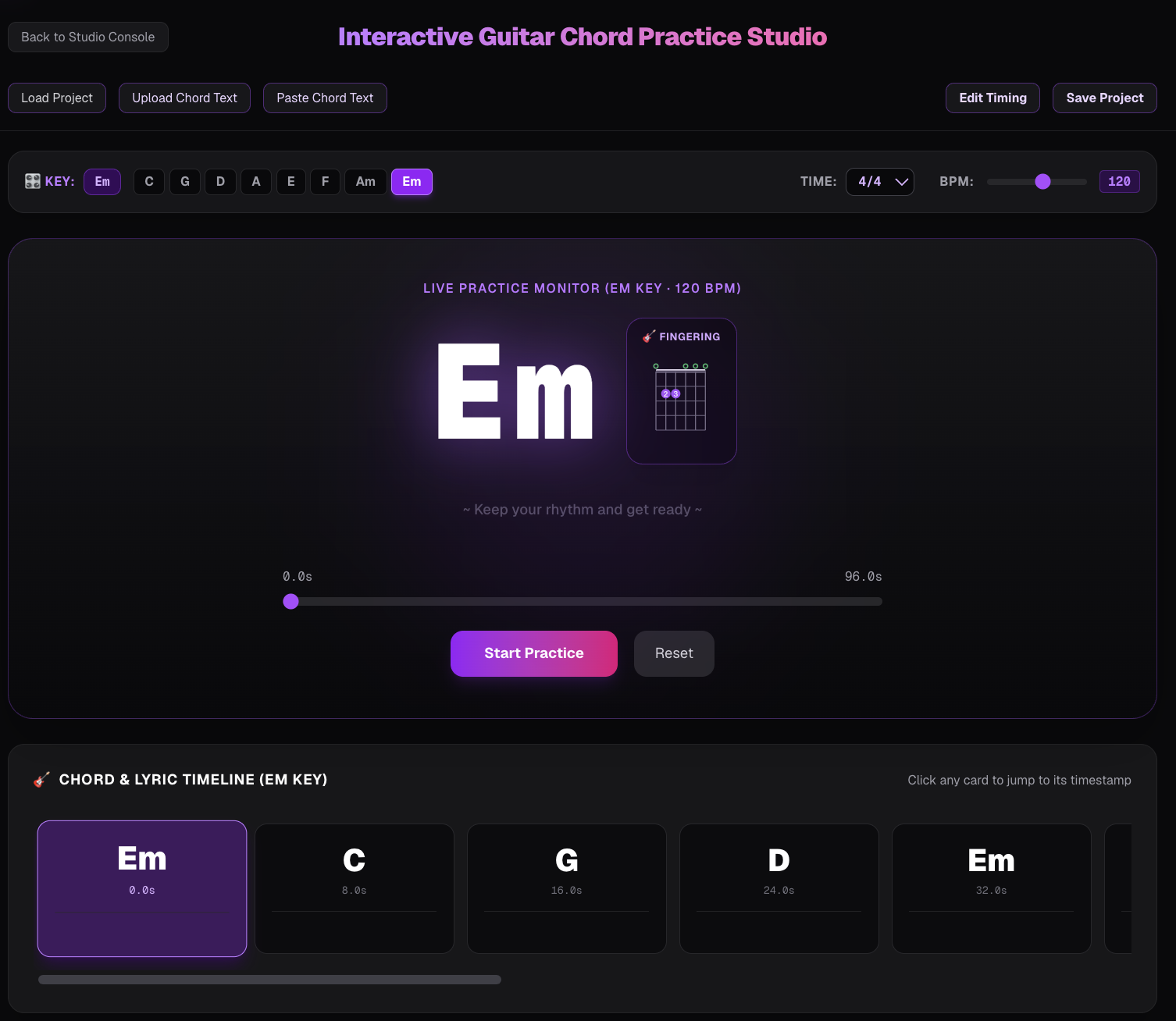
- The Chord Timeline: A visual scroll of the song's chords (like the image above showing Em, C, G, D).
- Live Practice Monitor: A giant, easy-to-read display of the current chord (e.g., Em) with a fingering diagram right next to it.
- BPM Control: You can slow down the tempo (e.g., 120 BPM) to practice at your own speed.
- Time Signature: Set the song to 4/4, 3/4, or any other signature.
4. A Step-by-Step Practice Routine
Here is a quick practice routine you can do right now:
- Load the song: Upload your audio or paste your chords.
- Set the BPM: Start at 60-80 BPM. Slow and steady.
- Start Practice: Hit the "Start Practice" button.
- Follow along: Watch the big Em display. When it switches to C, change your finger position.
- Loop and speed up: Once you can switch without pausing, increase the BPM by 5-10 and try again.
Why This Beats Traditional Chord Sheets
Traditional chord sheets are static. You have to guess the timing. Our practice studio syncs the chords to a timeline and gives you a visual cue for the exact moment you need to switch.
Whether you are a beginner trying to nail your first Em chord or an intermediate player working on G-C-D transitions, this tool provides a structured, real-time way to improve.
Stop searching for PDFs. Start practicing with the actual song.
SonicAura Studio — Making music practice smarter.
Ready to try it?
Open the tool in your browser — no install, no signup.
Try Chord Practice Studio Now →