
Integrating SonicAura MCP into Your AI Agents: The Production-Ready Way
The rise of AI Agents has shifted the paradigm from simple prompt-response interactions to autonomous workflows. Agents can now search the web, query databases, and execute code. But when it comes to audio processing—like separating vocals, denoising podcasts, extracting MIDI, or adding studio reverb—developers often hit a wall.
Why? Because audio files are heavy, and Large Language Models (LLMs) are not designed to handle raw binary data or multi-megabyte Base64 strings.
In this guide, we will explore how to use the Model Context Protocol (MCP) to give your Agents audio "superpowers" via SonicAura, while avoiding the most common pitfalls of large file handling and LLM hallucinations.
The Challenge: Why Audio Breaks Normal Agent Workflows
If you are building an Agent using frameworks like the OpenAI Agents SDK, LangChain, or CrewAI, you might be tempted to read an audio file locally, convert it to Base64, and pass it into the prompt.
Don't do this.
If a file is larger than 1MB, embedding it into the LLM's context window will result in:
- JSON Truncation: The LLM will fail to serialize the tool call arguments, causing
Invalid JSON inputerrors. - Context Exhaustion: You will burn through tokens and money instantly.
- Timeouts: Audio processing takes time. Synchronous API calls will eventually hit the HTTP timeout limit.
The Solution: Atomic Tools + Direct Upload & Polling
SonicAura provides a native MCP server that exposes atomic, 1-to-1 semantic tools optimized for LLM reasoning. Instead of a confusing "do-everything" endpoint, we provide precise tools like extract_vocals, split_6stems, export_midi, and denoise_audio.
To build a production-ready Agent, we need to change the architecture. The golden rule is: Let Python handle the heavy lifting, and let the Agent handle the orchestration.
Here is the 5-step workflow:
Step 1: Get a Presigned URL (Python)
Instead of passing the file to the Agent, your Python script uses the get_upload_url MCP tool to generate a secure Cloudflare R2 upload link.
Step 2: Direct Upload (Python)
Your Python code uploads the audio file directly to the cloud using requests.put(). The LLM is completely bypassed here, saving time and tokens. You get a lightweight source_key (e.g., uploads/user_id/audio.mp3).
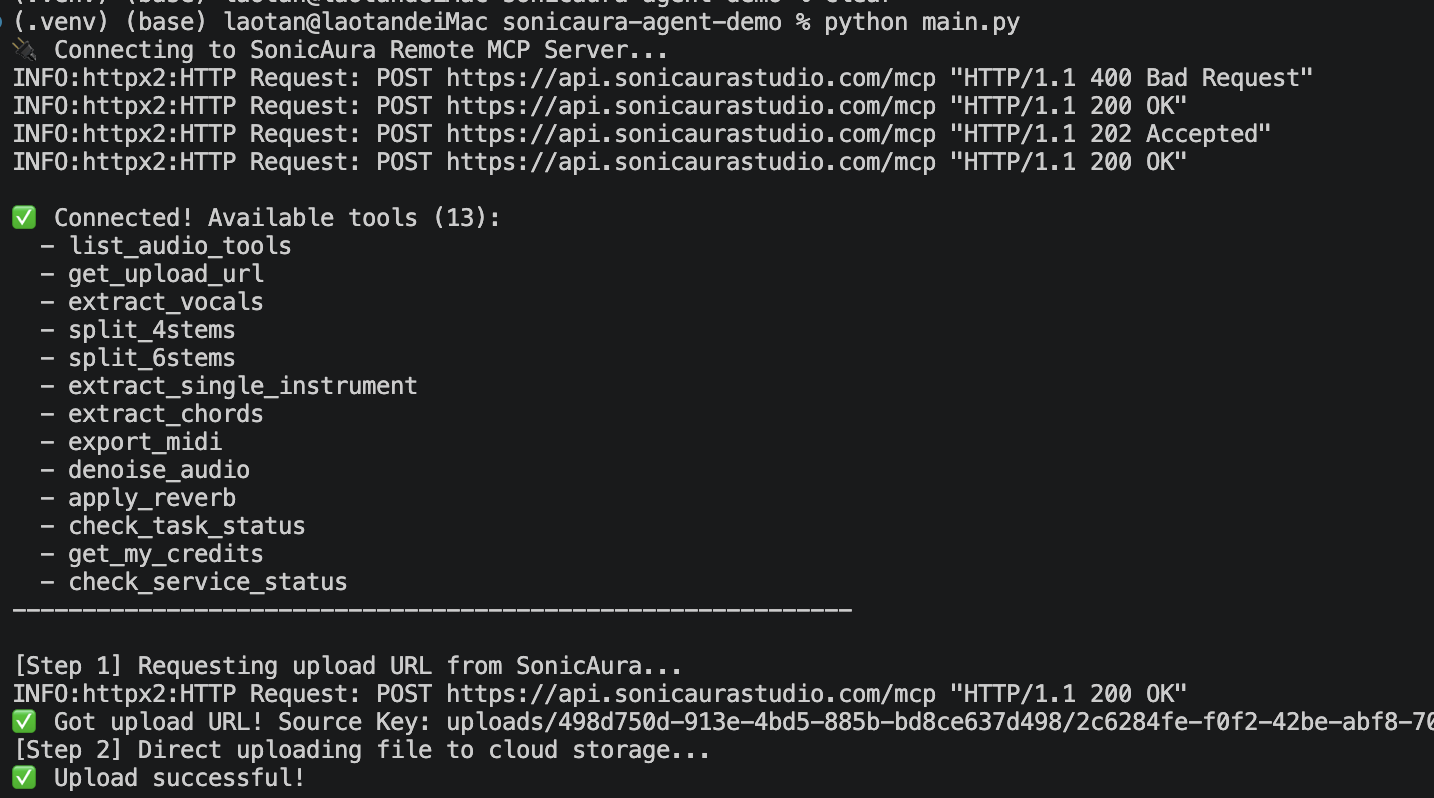 Python handles the heavy lifting of uploading large audio files directly to Cloudflare R2.
Step 3: Instruct the Agent (LLM)
Now, you pass the source_key to the Agent. The Agent has access to the SonicAura MCP tools.
Step 4: Asynchronous Execution (LLM)
The Agent selects the exact tool it needs. For example, if the user asks to "extract the vocals", the Agent calls extract_vocals(source_key="..."). Because audio processing is heavy, SonicAura immediately returns a task_id.
Step 5: Foolproof Polling (LLM)
The Agent then calls check_task_status(task_id="..."). If the status is processing, the server politely waits a few seconds and tries again. Once it returns done, the Agent extracts the downloadable URLs from the tracks dictionary and delivers them to the user.
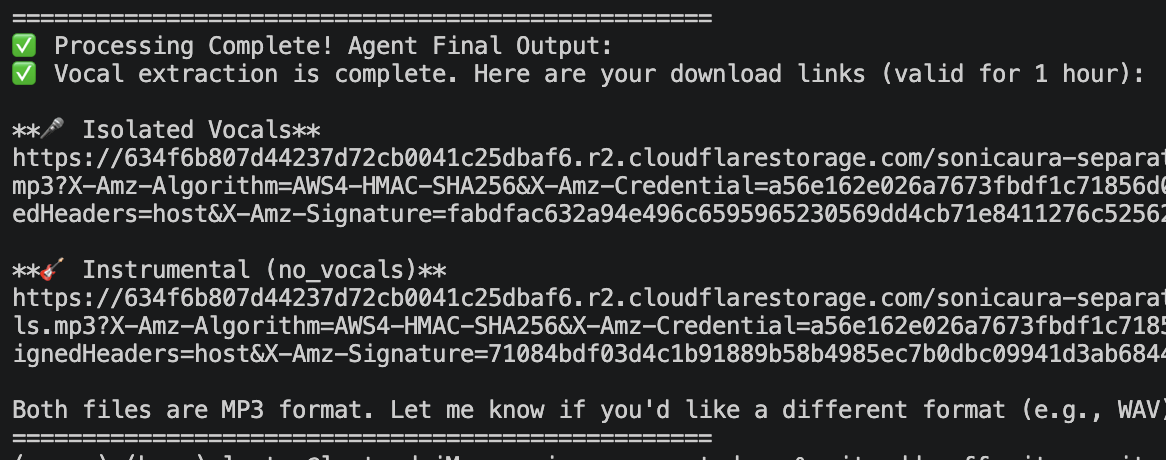 The Agent automatically polls the status and successfully returns both
 vocals and no_vocals download links.
💡 Pro-Tip: Resilient Design for LLM Hallucinations LLMs sometimes "hallucinate" and pass extra parameters (like
task_type="2stems"). Our server is built with a resilient**kwargsdesign, absorbing these hallucinations to prevent infinite retry loops (MaxTurnsExceeded).
How to Implement It (OpenAI Agents SDK)
Here is a quick look at how you configure your Agent to handle this workflow. (For the full runnable code, check out our GitHub Demo Repository).
import asyncio
import os
from agents import Agent, Runner
from agents.mcp import MCPServerStreamableHttp

async def main():
    # 1. Connect to SonicAura Remote MCP Server
    async with MCPServerStreamableHttp(
        name="SonicAura",
        params={
            "url": "https://api.sonicaurastudio.com/mcp",
            "headers": {"Authorization": f"Bearer {os.getenv('SONICAURA_API_KEY')}"}
        }
    ) as sonicaura_server:

        # 2. Create an Agent with clear instructions
        agent = Agent(
            name="Audio Engineer",
            model="gpt-4o", # or deepseek-chat
            instructions=(
                "You are an audio assistant. When you use a processing tool, it returns a `task_id`. "
                "You MUST then call `check_task_status` with that `task_id`. "
                "Keep polling until it returns 'done', then return the final download URLs "
                "found inside the `tracks` dictionary."
            ),
            mcp_servers=[sonicaura_server]
        )

        # 3. Pass the lightweight source_key to the Agent.
        # No hardcoded task_type needed! The Agent understands natural language.
        prompt = "Please extract the vocals (2 stems) from this audio: uploads/user_123/song.mp3"

        # max_turns is set higher to accommodate async polling
        result = await Runner.run(agent, prompt, max_turns=30)
        print(result.final_output)

if __name__ == "__main__":
    asyncio.run(main())
Ready to try it?
Open the tool in your browser — no install, no signup.
Explore the SonicAura Developer Docs →