
From UI to Autonomous Agents: Exploring Sonicaura’s Workspaces, MCP Connector, and AI Integration
At Sonicaura Studio, we know that no two workflows are exactly the same. A podcast editor wants a simple, click-to-clean interface, while an AI developer wants an agent to handle audio processing autonomously in the background.
To solve this, we didn't just build one app. We built an audio engine that adapts to you. Today, we are breaking down the three distinct ways you can integrate Sonicaura into your daily workflow.
1. Scenario-Based Workspaces (For Creators)
If you prefer a visual interface, our UI has you covered. Instead of throwing every feature into a single confusing dashboard, we built dedicated Workspaces tailored to specific roles:
- Podcast & Voiceover: Broadcast-ready noise reduction in a click.
- Cover Artist: Instant instrumental extraction to sing along.
- Instrument Learner: Accurate chord detection and MIDI export for practice.
- Pro Studio: A full suite for 6-stem separation and spatial reverb.
All processing runs 100% locally in your browser, ensuring your raw audio never leaves your device.
2. The MCP Connector (For Developers)
For those building the next generation of AI apps, we provide a hosted MCP (Model Context Protocol) Server.
Instead of writing complex, custom audio APIs, you can simply generate an MCP API Key from your Sonicaura dashboard and use it as an MCP Connector. This allows your AI hosts—like Claude Desktop, Cursor, or VS Code—to securely communicate with our audio engine. It acts as the bridge between your local files and our processing power.
3. Autonomous AI Agents (The Ultimate Workflow)
When you combine the MCP Connector with LLMs, the magic happens. You aren't just calling APIs; you are empowering AI Agents.
Your agent can now reason, decide which audio tool to use, and execute multi-step workflows autonomously. You don't have to manually upload files or click buttons. You just tell your agent what you want, and it orchestrates the entire process.
See the AI Agent in Action
Here is a real-world demonstration of how an AI Agent (using deepseek-flash in VS Code) connects to our MCP Server, reasons through the task, and automatically isolates vocals from a local file.
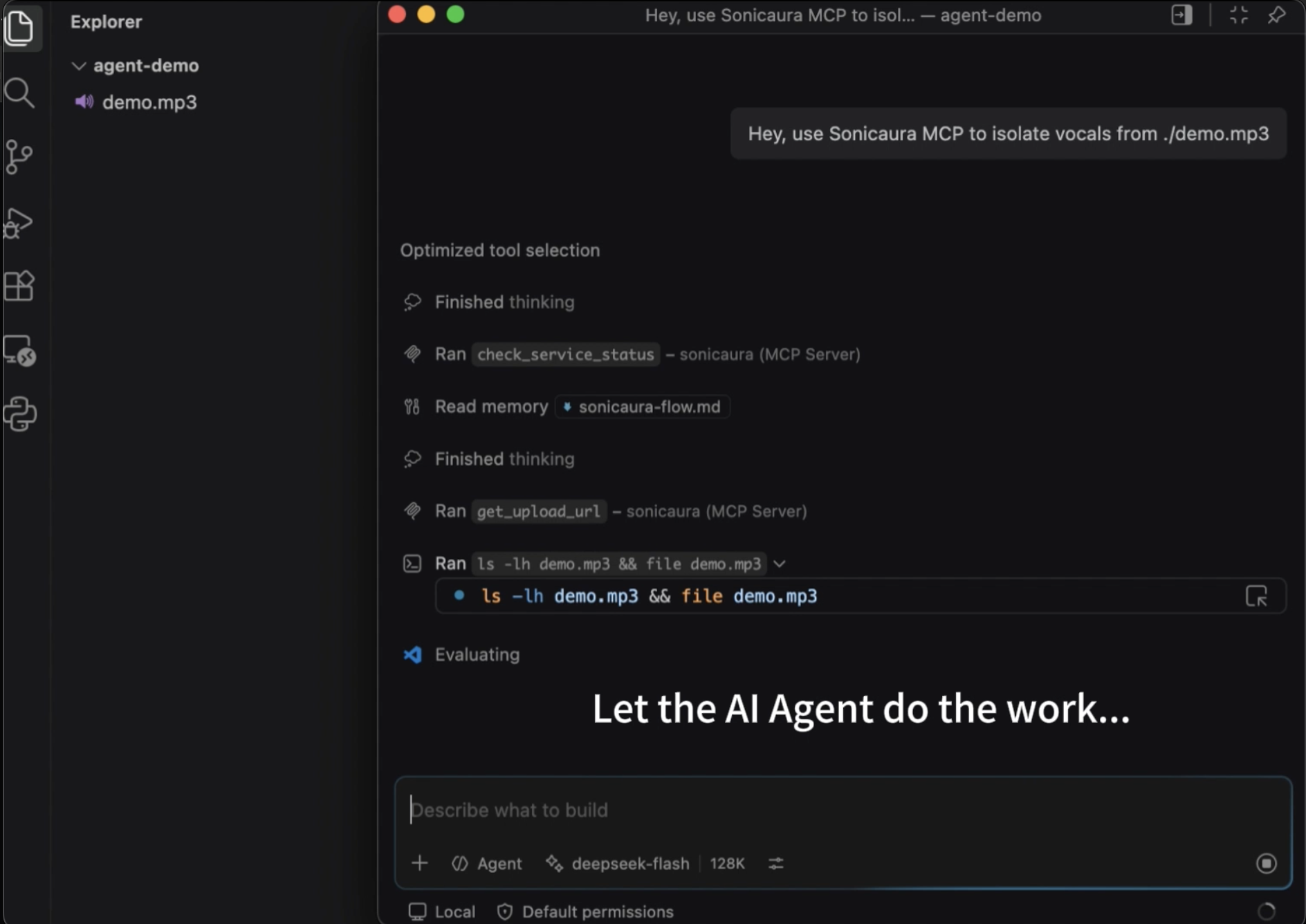
Click the image above to watch how the agent executes the isolate_vocals tool via MCP, completely hands-free.
Which One Should You Use?
- Just want to clean a track? Go to the Workspaces.
- Building a Cursor plugin? Grab your MCP API Key.
- Want a fully autonomous audio editor? Let your AI Agent handle it.
By connecting the visual, the programmatic, and the autonomous, Sonicaura becomes more than just a tool—it becomes your personalized audio infrastructure.
Ready to build your own workflow? Head to your dashboard to get your API key and check out our GitHub Demo.